
ข้อมูลสำหรับผู้แต่ง
เงื่อนไขในการพิจารณาผลงาน
1. ผลงานวิจัยที่ส่งพิมพ์จะต้องไม่เคยตีพิมพ์ที่ใดมาก่อน หรือไม่อยู่ระหว่างการพิจารณาตีพิมพ์ในวารสารอื่น
2. บทความที่ได้รับการตีพิมพ์แล้ว จะเป็นลิขสิทธิ์ของวารสารสถาบันบำราศนราดูร
3. ค่าบริหารจัดการ
3.1 วารสารสถาบันฯยกเว้นค่าลงทะเบียนแรกเข้า และค่าสมาชิกรายปี
3.2 เจ้าหน้าที่สังกัดกรมควบคุมโรคผู้นิพนธ์ชื่อแรก
มีค่าใช้จ่ายในการพิสูจน์อักษรบทคัดย่อ/บทความภาษาอังกฤษ และการจัดหน้าตีพิมพ์
โดยบทความภาษาไทย 1,500 บาท และบทความภาษาอังกฤษ 2,500 บาท
3.3 ผู้นิพนธ์ทั่วไป
มีค่าใช้จ่ายในการพิสูจน์อักษรบทคัดย่อ/บทความภาษาอังกฤษ และการจัดหน้าตีพิมพ์
โดยบทความภาษาไทย 2,500 บาท และบทความภาษาอังกฤษ 3,500 บาท
ท่านสามารถชำระเงินผ่าน QR Code หรือโอนผ่าน internet banking ธนาคารไทยพาณิชย์
เลขที่บัญชี: 431-061161-8 ชื่อบัญชี: BAMRAS JOURNAL BY BAMRASNARADURA
INFECTIOUS DISEASES INSTITUTE
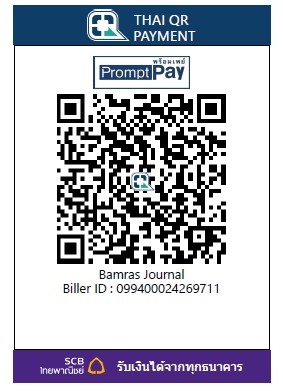
เริ่มชำระเงินตั้งแต่ 1 มี.ค. 63 เป็นต้นไป
ผู้นิพนธ์กรุณาส่งหลักฐานการชำระเงิน (สลิป) ทาง Email : bidijournal@gmail.com
หมายเหตุ : ใส่ชื่อบทความของท่านในหมายเหตุท้ายสลิป
4. กองบรรณาธิการจะพิจารณาต้นฉบับ ที่จัดทำตามคำแนะนำในการเตรียมต้นฉบับนี้เท่านั้น
โดยเฉพาะความถูกต้องของเอกสารอ้างอิงตามระบบ Vancouver
5. ผลงานทุกเรื่องจะได้รับการพิจารณาตรวจอ่านโดยผู้ทรงคุณวุฒิแบบ Double-blinded
อย่างน้อย 2 ท่าน/เรื่อง โดยผู้นิพนธ์จะต้องดำเนินการแก้ไขตามข้อเสนอแนะภายใน
ระยะเวลาที่กำหนด หากพ้นกําหนดจะถูกเลื่อนไปฉบับถัดไป
6. ผู้นิพนธ์ต้องตรวจสอบการเขียน Abstract ให้สอดคล้องกับบทคัดย่อ และ
ถูกหลักภาษาอังกฤษ หรือสามารถแจ้งความประสงค์ให้ทางวารสารจัดหา editor ให้
7. กองบรรณาธิการจะแจ้งให้ผู้นิพนธ์ทราบผลการพิจารณา กรณีที่ต้องแก้ไขก่อนเผยแพร่ควร
ตรวจสอบและแก้ไขต้นฉบับให้ถูกต้องตามหลักวิชาการ โดยขอให้ผู้นิพนธ์ส่งผลงานที่แก้ไข
ภายในระยะเวลาที่กำหนด
8. ส่ง file ต้นฉบับได้ทางระบบออนไลน์ สามารถเข้าไปดูรายละเอียด คู่มือการใช้งานเว็บไซต์
ได้ที่ URL:https://www.tci-thaijo.org/index.php/bamrasjournal/index
หากท่านสนใจในวารสารนี้ เราขอแนะนำให้ท่านทำตามขั้นต่อดังนี้
1. ศึกษาเกี่ยวกับวารสาร(คลิกที่นี่) เพื่อให้ทราบถึงขอบเขต วัตถุประสงค์ และเงื่อนไขในการตีพิมพ์บทความ
2. ศึกษาการเตรียมต้นฉบับ(คลิกที่นี่) (DOWNLOAD) เพื่อดูแบบฟอร์มการเขียนต้นฉบับของวารสารให้ถูกต้อง
3. ผู้เขียนจำเป็นต้องลงทะเบียน(คลิกที่นี่)กับวารสารก่อนที่จะส่งบทความหรือหากลงทะเบียนแล้วสามารถเข้าสู่ระบบ(คลิกที่นี่) และเริ่มกระบวนการส่งบทความ ศึกษาวิธีลงทะเบียน และเข้าสู่ระบบได้ที่นี่
4. เริ่มกระบวนการส่งบทความ(คลิกที่นี่) และส่งแบบฟอร์มส่งต้นฉบับเพื่อพิจารณาตีพิมพ์ (DOWNLOAD) ทุกครั้ง ศึกษาวิธีการส่งบทความคลิกที่นี่
วิธีส่งการแก้ไขบทความหลังส่งบทความสำเร็จ (คลิกที่นี่)
1. ในช่องไฟล์แก้ไขบทความ กดข้อความ "อัปโหลดไฟล์" ทางขวามือ
2. ในหน้าอัปโหลดไฟล์ ในช่องแรกเลือก "นี้ไม่ใช่การแก้ไขไฟล์ที่มีอยู่ ฉันต้องการอัปโหลดไฟล์ใหม่" ช่องที่สองเลือกไฟล์ของบทความเป็น "ไฟล์บทความ"
3. เลือกไฟล์ที่ต้องการอัปโหลดโดยการกดที่ "อัปโหลดไฟล์" และกดไปต่อจนเสร็จกระบวนการ
